OPENING QUESTION:
- Please have someone in your group review your code especially in light of our coding standards developed by our senseis
- Also - please submit your 4 step branch code to me on our classroom submission page HERE
OBJECTIVES:
- I will submit my 4 step branch code today
- I will write my first loop code segment during today's <short> class.
HELP FILES:
- I added a few help tutorials to our slide deck (Interesting side note, on at least two occasions the code.org debugger crashed and took my program with it... and it's there on tape!)
WORK O' THE DAY:
We'll just touch the surface of this today.
Let's check-in first, how did branches go?
Howzabout our shared Best Practices document that our Senseis wrote? Questions on that? (I'll put a link on the website too)
═══════════════════════════
Our Senseis are using <THIS> platform for development
═══════════════════════════
Senseis: Let's huddle for a bit today and see if you can upload successfully to the new website I developed for you on AWS.
You have unlimited access to the resources there.
- Please do NOT expand the reach of your explorations quite yet.
- There are options there that can get expensive in a hurry and I'd have to pay for those.
- Although also keep in mind I'm currently paying about $.22 a month for my website. So I'm very definitely agreeable to testing options but let's do that together IN CLASS first so we can check costs.
Rookies:
A loop is a command found in ALL programming languages. There are many different flavors:
- Loop Until <something> The loop runs UNTIL a certain condition occurs and then the loop terminates
- Loop While <something> The loop runs as long as a certain condition exists
- Loop/end loop: The loop runs until a line of code explicitly stops the loop
Loops are blocks of code that terminate with a line such as 'break', 'quit' or 'end'. Different programming languages use different terms but the effect is the same.
The bad news is (especially as a newbie), your code doesn't execute QUITE the way you thought it will... and the loop runs forever (hence the term "Infinite Loop").
In desktop coding environments infinite loops are annoying... they churn and churn and you have to force a break (if you're lucky) or terminate the program by closing a window or other drastic means. Sometimes you can 'break out' of an infinite loop by hitting {Esc}, {Ctrl-Esc}, {Break}, {Ctrl-x}, {Ctrl-c}or other key(s).
Sometimes you can't.
Mr W aside: I used to do my development work in Visual Basic. It has a VERY robust programming environment and the way to kill a running program was to hit the {Ctrl} and the {Break} key at the same time. Bad news now though, many new computers have omitted the {Break} key as keyboards have shrunk in size... which means you have to scour the interweb for different solutions to THAT particular beastie.
In the browser environment, infinite loops are particularly nasty because they keep chowing down on the user's computer resources allocated to the browser and very quickly lockup the browser tab (if your lucky) or the entire browser (if you're not).
Either way you have to close the tab or the browser and you'll lose any work you haven't saved.
IT
WILL
HAPPEN
TO
YOU!!!
═══════════════════════════
Please now go online and find a basic shape like a small ball or box or some such and download it to your 'images' or 'pictures' folder for this class or for this project (if you don't have such a folder, it might be a good idea to make that now)
Work with your group to learn how to place that new shape into a new program in App Lab.
Then use a loop to move that shape around the screen like THIS
═══════════════════════════
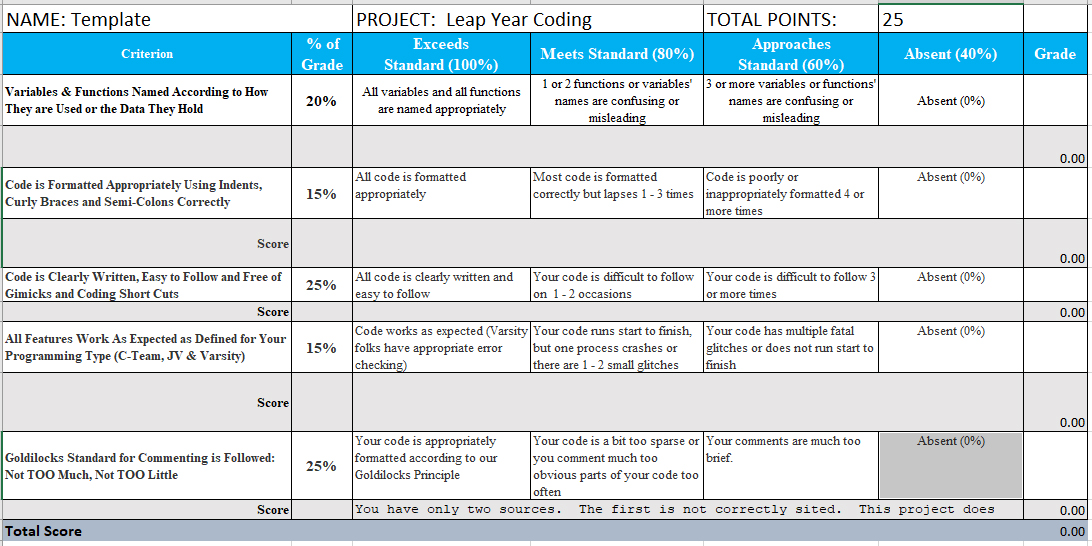
Although today is just kind of a fun, getting acquainted with loops (Rookies) and HTML (Senseis) -- Henceforth and Herewith we will start applying our 'Best Practices' to coding. Here's the basic rubric for that:
We will continue to work in our previous groups, but 'publish' our individual work on our own slides on the class slide deck HERE
Please continue the great collaboration you've started... Remember, Senseis, it's your job to look after the rookies. Help them out (you were a rookie once too!)
Rookies: Practice your loop coding schools by making it so the ball 'bounces' off the "walls" of your screen... have some fun, be creative!
- Just make it bounce off the screen edges however you can
- Now make it bounce off the 'walls' in a logical way
Here's where we are headed on Friday
- Then 'build' a paddle and see if you can make the ball 'bounce' off the paddle
- Then add code to move the paddle - although we'll probably need to learn about functions to do that well. We'll learn about them next time.
Senseis, time to put on your HTML pants and make it work like THIS (notice that you can -- and SHOULD -- use APP Lab for prototyping, you cannot simply copy and paste code out of APP Lab into html... although it would sure be nice if you could). Notice that the TimeLoop function is unique to AppLab and must be replaced in "real" JS
- Just make it bounce off the screen edges however you can
- Now make it bounce off the 'walls' in a logical way
Here's where we are headed on Friday
- Then 'build' a paddle and see if you can make the ball 'bounce' off the paddle
- Then add code to move the paddle - although we'll probably need to learn about functions to do that well. We'll learn about them next time.